
Placing an order
Every price, name and number in this guide is invented test data, shown only as an example — any resemblance to real companies is coincidental. Real figures appear once you register.
You can start an order in four ways:
- New order on the Dashboard
- New order on the Orders page
- Proceed to order in the cart
- Order again on an earlier order, which copies its recipient and products
An order has three steps: Products, Recipient and Review. Only a verified company can place orders.
The cart
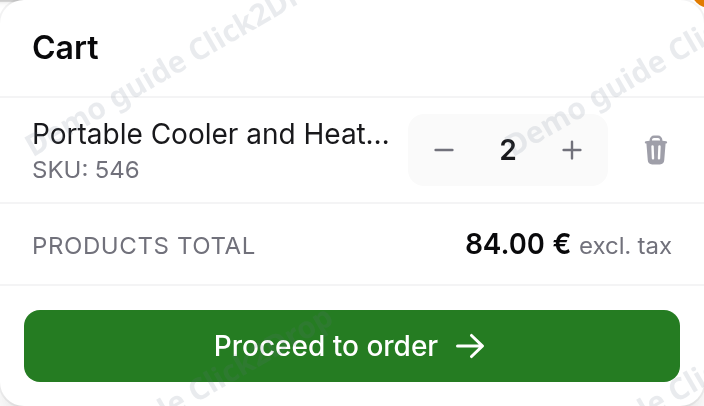
The cart is in the top bar, next to your wallet. The number on it is how many different products it holds.
Select it to see the products. For each one you can:
- change the quantity with − and +, up to the stock we hold
- remove it with the cross
Proceed to order opens a new order with these products.
The cart is saved only in this browser. You will not see it on another device, and your team members will not see it. It is cleared when you log out, or after some time without activity. To keep an order or hand it to a team member, save it as a draft.
Unfinished orders and drafts
If you leave an order before placing it, it waits in this browser. Orders then shows Continue your order instead of New order. The order opens on the step where you stopped.
Start over at the top right clears the recipient and all the products. You confirm it first. Nothing has been ordered yet, so nothing else changes.
Saving a draft
A draft is an order saved to your account. You can open it on any device. Team members who can place orders can open it and continue it too.
Select Save draft at the top right, on any step. The order needs at least one product and a complete recipient. Until it has both, the button is greyed out and says what is missing.
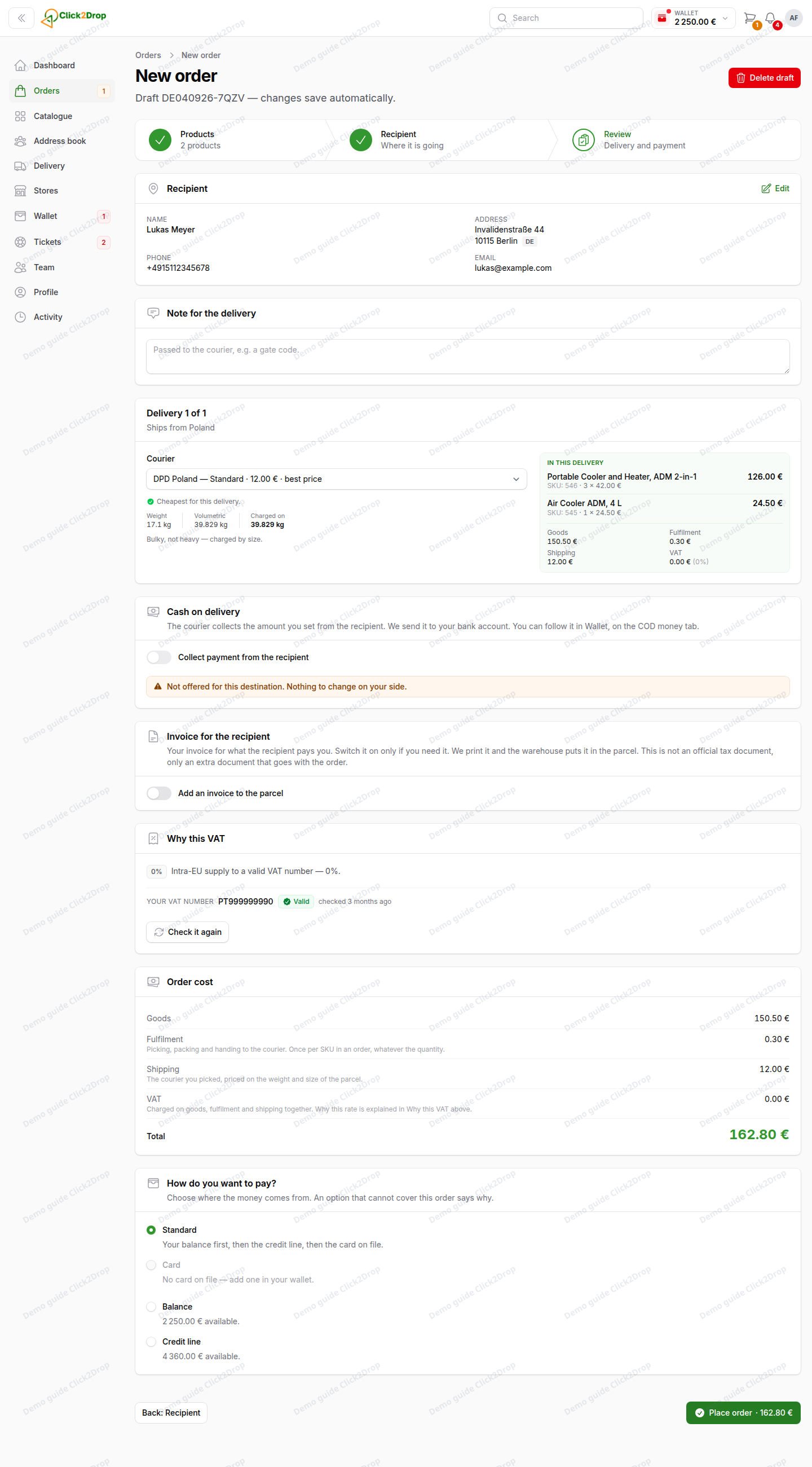
After saving, you stay in the order:
- the heading shows the draft number
- every change saves automatically
- Delete draft replaces Save draft and Start over
- the cart is empty and ready for your next order
Drafts are in Orders with the status Draft. You can keep several. Open one to continue on the step where you stopped.
A draft does not reserve products or hold prices. When you open it, you see today's prices. Products that are no longer available are removed, and a message tells you so. Everything is checked again when you place the order.
Delete draft deletes the draft for good, after you confirm.
Step 1: Products
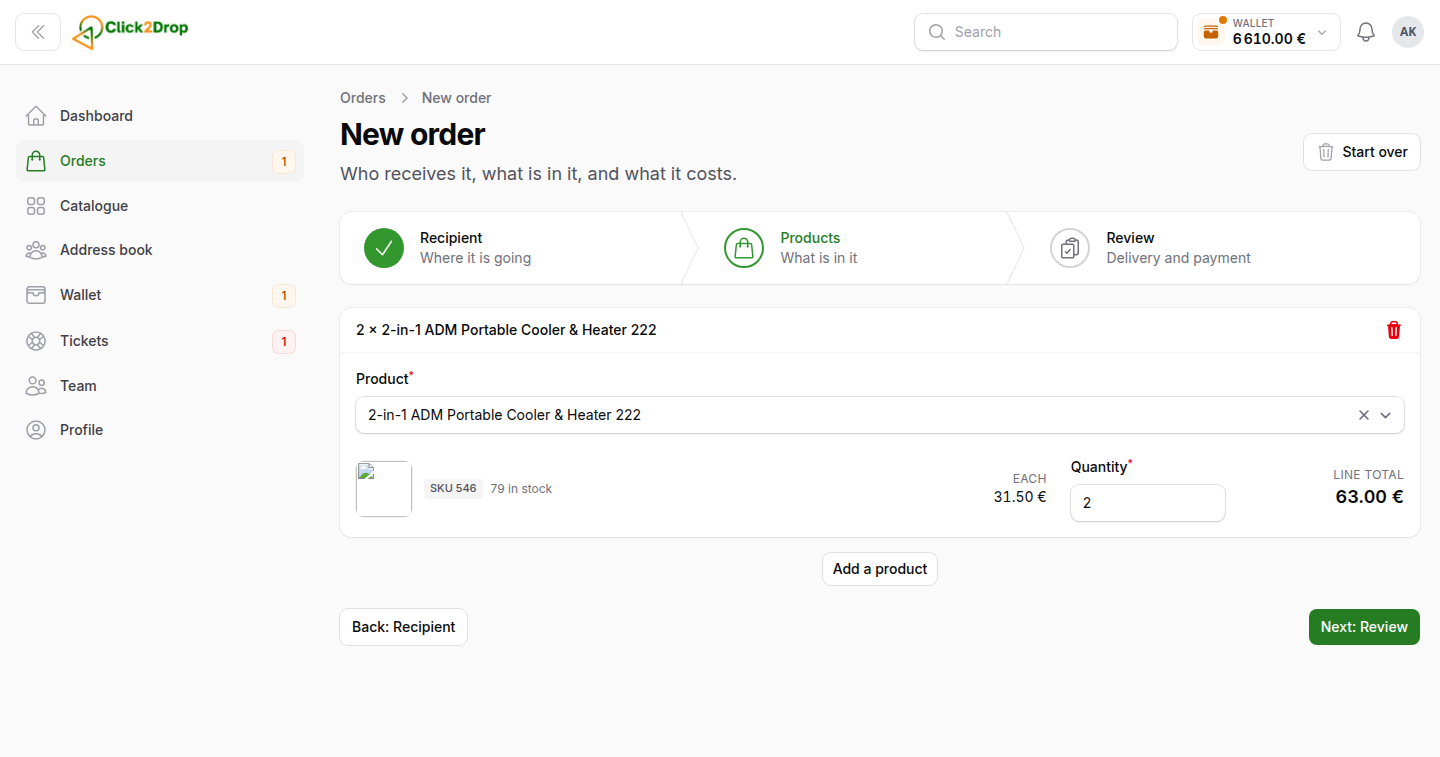
The order opens with the products from your cart. To add more, select Add more products and enter a name or a SKU. The list shows only products in stock. A product already in the order is not offered again. Change its Quantity instead.
Each line shows the SKU, the stock, the price per unit (Each), the Quantity and the Line total. The bin icon removes the product, from the cart too. If you enter more than we have, the line tells you.
Products total under the list is without tax. The step heading shows how many products are in the order.
Step 2: Recipient
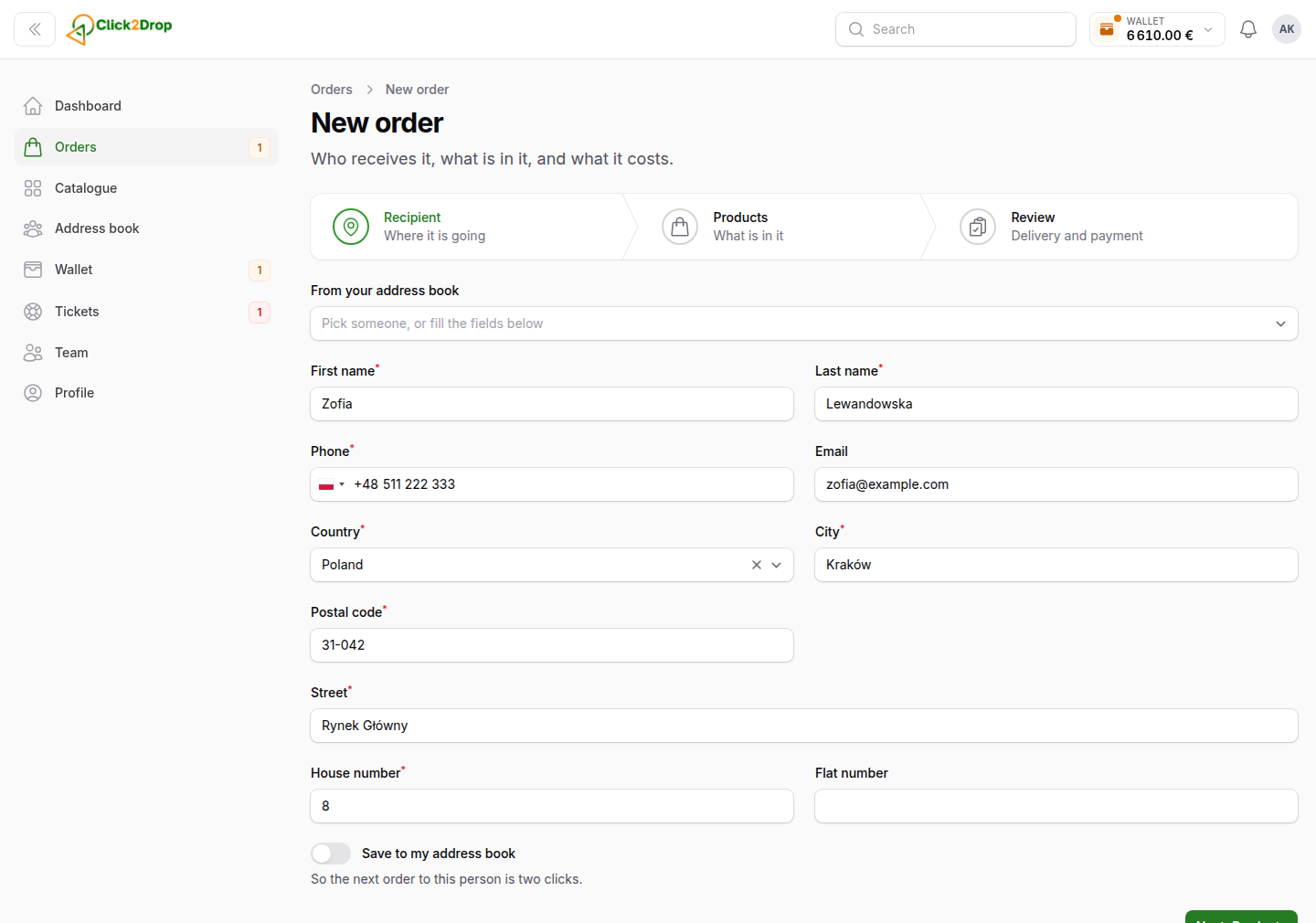
Pick the recipient in From your address book, and the fields fill in. Or enter the details yourself. Email and Flat number are optional. Everything else is required.
The Country list shows only countries we deliver to. The country decides the VAT and which couriers are offered.
Turn on Save to my address book to use this recipient again later. The recipient is saved when you place the order or save a draft. See Address book.
Step 3: Review
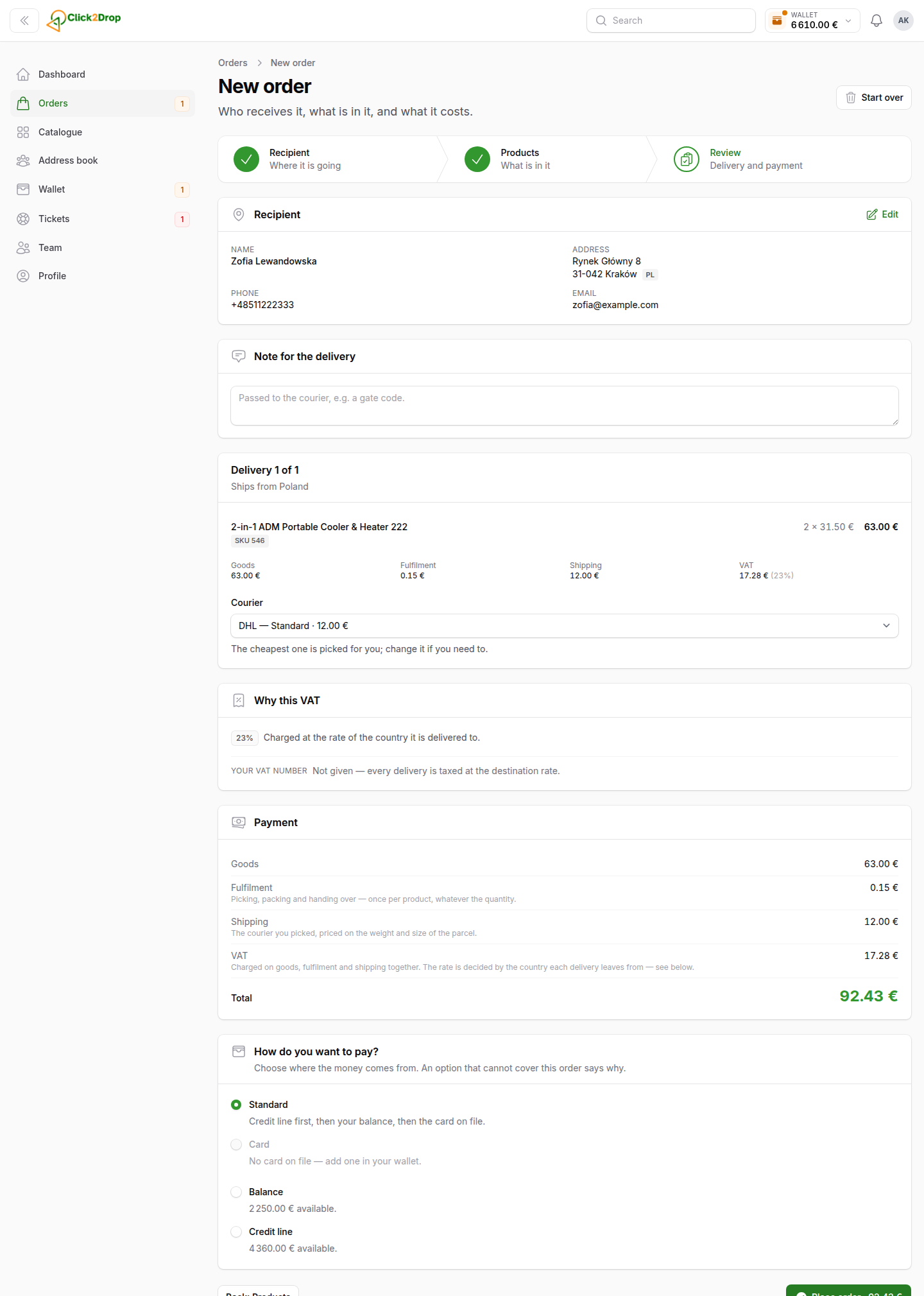
The last step shows the whole order before you pay. The blocks, from top to bottom:
- Recipient. Select Edit to go back to step 2.
- Note for the delivery. The courier reads it. Use it for a gate code or a floor.
- Delivery. The courier and the products of one parcel.
- Cash on delivery. The courier collects money from the recipient for you. It is not how you pay us. See Cash on delivery.
- Invoice for the recipient. Your invoice to your customer, packed in the parcel.
- Why this VAT. The VAT rate and the reason for it.
- Order cost. What you pay us for this order.
- How do you want to pay? Where the money comes from.
Delivery and courier
Products that ship from different warehouses travel as separate parcels. Each parcel has its own block, such as Delivery 1 of 2, with the country it ships from.
The cheapest courier that delivers to the door is chosen for you. It is marked best price. You can choose another one under Courier. The shipping cost is then recalculated.
Shipping is charged on the weight of the parcel. A large, light parcel is charged on its size instead. The block shows which one applies.
With a courier to a pickup point or a parcel locker, you also choose the point. The points nearest to the recipient's postcode come first. You can search by city, postcode or name. Only points that can take your parcel are listed.
If no courier is offered, the parcel is too heavy or too large, or we do not deliver there. Remove some products or write to us.
Invoice for the recipient
The invoice is off until you turn it on. It is your own invoice, not an official tax document, only an extra document that goes with the order. Turn on Add an invoice to the parcel only if your customer needs one from you. We print it, and the warehouse puts it in the parcel.
Choose what the invoice shows: Only the total or Every item with its price. With every item, also enter what you charge your customer for shipping. Then choose the currency and the VAT line.
The invoice number starts with your own prefix. If you have not set one yet, the block asks for it. The invoice is in Polish for a recipient in Poland, and in English for everyone else. With cash on delivery, the invoice total must equal the amount the courier collects.
If the order goes in several deliveries, each delivery gets its own invoice. The currency is filled in from the recipient's country. Enter a total for each delivery, or price every item and the shipping of each delivery.
Why this VAT
Catalogue prices are without VAT. VAT is added on the goods, Fulfilment and shipping together. It is decided for each delivery, by the first rule that fits:
- Your company has no VAT number, or it is not confirmed in the EU register. You pay the rate of the delivery country.
- Your company is registered in the country the delivery ships from. You pay that country's rate.
- The delivery stays inside the country it ships from. You pay that country's rate.
- In all other cases, the VAT is 0%. This is a delivery to another EU country, with a valid VAT number.
The block shows your VAT number and when it was last checked. Check it again checks it in the EU register once more. The VAT is then recalculated.
Order cost
- Goods. Your price times the quantity.
- Fulfilment. Charged once for each SKU in the order, whatever the quantity.
- Shipping. The courier you chose.
- Cash on delivery fee. Only when cash on delivery is on.
- VAT. On the goods, Fulfilment and shipping together.
- Total. What you pay us for the order.
How do you want to pay?
- Standard. Your balance first, then the credit line, then the card on file.
- Card. The whole amount on the saved card you choose.
- Balance. The whole amount from your balance.
- Credit line. The whole amount from your credit line.
An option that cannot pay this order is greyed out and says why. Card, Balance and Credit line use only that one source.
Placing the order
- Select Place order at the bottom. The button shows the total.
- A window shows a summary of the order. Check it.
- Select Place order in the window. The payment is taken at once, and the order can no longer be changed.
If a price changed since you opened the review, the window shows the old and the new total. Check it and confirm again.
You then see the order page. What happens next depends on the payment:
- Paid. The order goes to the warehouse.
- Your bank asks you to confirm the card payment. Select Confirm the payment on the order page and finish it with your bank.
- The payment did not go through. The order is placed and the products are reserved. Its status is Awaiting payment. Pay it from the order page with Pay the order. An order that stays unpaid is cancelled when the reservation ends.
When something goes wrong
- A product is no longer available. Remove it in step 1 and place the order again.
- No courier is offered. Remove some products or write to us.
- We do not deliver to the recipient's country. The panel says so when you choose the country. Write to us if you need it.
- The warehouse could not accept the order. Nothing was ordered. Try again in a few minutes, or write to us.
- The payment option can no longer pay the order. Choose another way to pay. Nothing was ordered.
You can write to us in Tickets.
Last updated October 24, 2026